
Beyond a single horizon line
More angles where they matter
Multi-Row 360 & 3D Product Photography
Multi-row 360 and 3D product photography lets customers rotate, tilt and inspect a real product from several elevations without creating a CGI model.
A standard single-row spin is ideal when every important feature can be seen from one useful camera height. Multi-row 360 product photography—also called 3D product photography—adds camera angles above and below that row. The resulting 3D product view lets the customer move horizontally around the product and vertically between those viewing positions.
That added movement is valuable when the top surface, underside, opening, controls or overall shape contributes to the purchase decision. The completed experience may be described as a 3D product spin or interactive 3D product view, but it is not a computer-generated 3D model. See how PhotoSpherix uses 360 and 3D terminology. PhotoSpherix photographs the real physical product at multiple horizontal and vertical angles, finishes the complete image set and prepares it for interactive display. We provide the photography service; your team does not need to buy or operate capture equipment.
30Years in 360
6,000Sq. Ft. Indianapolis Studio
4Capture Stations
150Products per Day
Trusted by product teams at





















A five-elevation capture plan
Each row has a job.
A practical five-row 360 uses five deliberate camera elevations. The product still makes a complete rotation at every elevation; the rows change what the customer can inspect from above, at eye level and below.
Row +2
Top and openings
Reveals lids, controls, openings and the overall top geometry.
Row +1
Upper three-quarter
Connects the top surface to the product’s primary shape and features.
Row 0
Primary viewing row
Shows the familiar eye-level rotation, labels, connections and overall form.
Row −1
Lower three-quarter
Reveals lower controls, feet, mounting points and transitions toward the base.
Row −2
Base and underside
Shows underside geometry when it matters to installation, use or compatibility.
Rows and frames are different decisions. Rows determine viewing height. Frames determine how smoothly the product rotates at each height. Five rows with 24 frames per row produce 120 source photographs; five rows with 48 frames produce 240.
01
A useful reason for every row
When 3D product photography earns its keep
Multi-row is most useful when changing the camera height reveals information a standard spin cannot. A customer may need to see controls on top of a machine, the opening of a bag, the inside of a container, connections below an assembly or the complete form of a sculptural product.
The question is not whether extra movement looks impressive. The question is whether it helps the customer understand the product, verify compatibility or buy with greater confidence. Additional rows require more capture, processing, retouching, quality control and delivery data than single-row 360 photography. PhotoSpherix recommends them when that investment produces useful product information. If the important features remain visible from a single row, a standard 360 is usually the clearer and more economical answer.
Compare single-row and multi-row capture ↗ Review pricing factors ↗
02
A practical production standard
Five rows and 120 source photographs
A five-row capture with 24 photographs in each row is a strong starting point for many products. The center row supplies the familiar eye-level rotation. Two positions above it reveal top surfaces and openings, while two lower positions provide additional shape and underside information. Together, the five rows create 120 organized source images. Every finished frame can also be delivered as a full-resolution product still for detail views, merchandising and downstream content.
This is a starting point, not a fixed package. A product’s geometry, size, finish, required viewing range and delivery environment may justify a different row or frame count. Camera height and row spacing are planned so movement feels intentional and important features do not fall between views. We establish those decisions with the product before committing a larger catalog to production.
03
Products with more to explain
Where additional angles make a difference
Multi-row photography works especially well for products with pronounced depth, important top surfaces or features at several heights. Common candidates include appliances, tools, pumps, machinery, footwear, bags, furniture, controls, technical assemblies and products with lids, openings or recessed components.
Surface finish matters too. Glass, chrome, glossy black materials and reflective metal must remain readable as both the product and viewing angle change. The lighting plan is tested across the useful range before production begins, and frame-to-frame finishing must remain consistent across every row. The goal is not to force every product into the same rig. It is to build a repeatable treatment around the actual product family and what its customers need to inspect.
04
More files require better organization
Capture, processing and quality control
A five-row product produces five times the source imagery of a 24-frame single-row spin. Product identification, file organization and repeatable finishing become essential—especially when the project includes dozens or hundreds of SKUs.
PhotoSpherix keeps every row and frame connected to the correct product throughout capture and processing. While the next product reaches the camera, completed image sets can move through alignment, color and exposure finishing, background work and cleanup. Experienced reviewers then check the interactive movement, product position, row transitions and frame-to-frame consistency before the work is published to the client. Automation handles useful repetition; photographers remain responsible for the decisions and final quality.
05
Review the experience—not a contact sheet
Interactive approval and revisions
Your team needs to evaluate how a multi-row product moves, not merely confirm that 120 separate files exist. PhotoSpherix publishes the interactive view to a project-specific review area after internal quality control. Reviewers can move around the product, approve it or attach a change request to the correct SKU.
For catalog programs, review can happen continuously while photography remains underway. Approved products can move toward export as later products are captured and processed. This rolling workflow prevents a large project from becoming one final all-or-nothing approval event. It also keeps comments, revisions and status connected to the product rather than scattered across email messages, spreadsheets and downloaded image folders.
06
Choose the useful level of movement
Multi-row or full 360×360?
Multi-row provides a controlled set of vertical viewing positions. Full 360×360 capture aims for much more complete top-to-bottom exploration. The difference affects the number of photographs, product support, capture time, retouching, viewer weight and cost.
Many products gain everything they need from three or five carefully planned rows. Full spherical coverage is better reserved for products whose complete top and bottom geometry genuinely matters. PhotoSpherix starts with the buying question, not the largest available image count. We will recommend a standard spin when one row is enough, multi-row when several elevations provide meaningful information, and full 360×360 when nearly unrestricted exploration justifies the added production.
Multi-row product study
See how additional elevations reveal more of the product.
 Open interactive 360
Multi-row 360
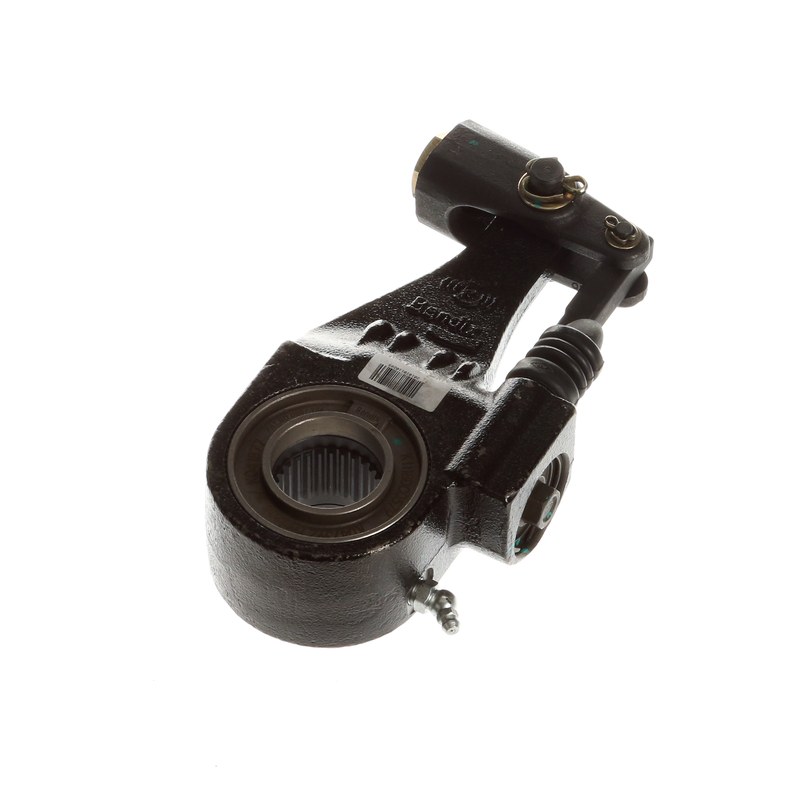
Bendix 201810110289 360 Product Photography
Interactive 3-row Bendix automotive component photography with 24 frames per row.
Explore this product study →One product or an entire catalog
Test the viewing plan before volume production.
For a multi-product program, representative products establish the camera positions, row count, lighting, crop, movement and finishing standard. Your team approves the treatment before the rest of the catalog moves through capture.
Photography in practice
Additional elevations reveal the details a single row cannot
Lighting, position and point of view are chosen around what you, the customer, need to understand about the product.
Drag to rotate · Interactive 360
Start with what must be visible
Does the top, bottom or shape affect the buying decision?
Send us the product details and intended sales channels. We’ll recommend the useful capture—not simply the most elaborate one.