
Chrome and mirror-polished metal
These surfaces reflect the studio with high clarity. Large controlled shapes are used to define curvature while camera, rig and room reflections are minimized throughout the rotation.
Chrome, polished metal and glossy surfaces reflect the entire studio. Successful 360 product photography controls what the product sees through every angle of rotation.
Chrome, polished stainless steel, glossy black plastic and painted metal do not simply reflect light. They reflect the room, camera, background, support equipment and every bright or dark shape surrounding the set. Those reflections define curvature, edges and finish—but they can also hide important product details.
PhotoSpherix approaches reflective-product photography as controlled surface communication. The goal is not to remove every reflection until polished metal looks gray and lifeless. The goal is to shape reflections so buyers can understand the product’s geometry, material, construction and functional features throughout a complete 360 rotation.
An opaque matte product is primarily described by light falling on its surface. A mirror-like product is described by what appears in that surface. Move the product a few degrees and the reflected environment moves with it. A highlight that defines an edge in the starting frame may grow into a distracting white band, disappear completely or reveal the camera on the opposite side.
A single hero image can be refined around one chosen angle. A 360 product view must remain believable through every frame. The lighting, background and reflected shapes need to communicate consistent form as the product rotates. Labels, fasteners, ports and machined details must remain readable instead of dropping into black areas or being covered by broad highlights.
The challenge increases when one assembly combines several finishes. Similar planning applies to glass and transparent product photography, where transmitted light and reflected surroundings must work together. A pump may include cast metal, polished hardware, black hoses, printed labels and glass or plastic components. Each material needs enough separation to remain understandable without breaking the visual consistency of the whole product.
Can the approved reflection pattern remain useful through every frame and be repeated across the entire product family?
Each manufactured surface reflects and scatters light differently. Representative samples should cover the actual finish variations in the catalog.
These surfaces reflect the studio with high clarity. Large controlled shapes are used to define curvature while camera, rig and room reflections are minimized throughout the rotation.
Grain direction, machining marks and edge transitions help communicate manufacturing quality. Lighting must reveal texture without producing frame-to-frame bands that appear to flicker.
Painted surfaces combine color with reflected highlights. The capture must preserve the approved color while using reflections to show panel shape, bends and molded contours.
Black materials can lose edges and openings against dark reflections. Controlled light and background separation keep the product black while making its geometry readable.
Glass, rubber, metal, paint, labels and molded components may all occupy one product. The treatment must preserve each material without making the assembly feel artificially pieced together.
Reflective products are often lit indirectly. Large white, gray and black surfaces become the shapes visible in the product, while carefully positioned lights control their brightness and transition. Those reflected bands establish edges, curvature and changes in plane. Flags and negative fill can create dark separation where a bright room would otherwise flatten the product.
The complete rotation is tested before final capture. We look for camera and rig reflections, abrupt highlight movement, labels that disappear, edges that merge into the background and materials that become difficult to distinguish. Small changes in product height, camera position or reflected-panel placement can improve the entire sequence.
Polarization can reduce some glare from painted or nonmetallic surfaces, but it does not make chrome stop reflecting its environment. Diffusion can soften a source, but a very large bright reflection may still hide form. The correct treatment is built around the product’s actual finish and geometry rather than a single “anti-glare” technique.
Polished products reveal fingerprints, dust, oil, adhesive residue, protective-film marks and fine scratches. The project plan should identify the acceptable sample condition, cleaning method, protective-film removal and who can approve work on valuable or production-sensitive surfaces.
Photography should represent a sellable product accurately. Normal handling dust can be cleaned, and minor repeated finishing may be part of the approved workflow. Damage, inconsistent plating, deep scratches or manufacturing defects require a deliberate decision: replace the sample, document the condition or authorize additional retouching. Retouching should not quietly turn a damaged sample into a product the manufacturer does not actually ship.
For a product family, the sample set should include the finishes and shapes most likely to change the lighting: chrome and painted versions, black and light colors, flat and highly curved surfaces, printed labels, glass components and assemblies with several materials. The easiest SKU is rarely the best test of a catalog treatment.
The approved sample defines product orientation, starting frame, rotation direction, camera height, frame count, crop, background, scale within the canvas, reflection pattern, label visibility, cleanup level and required supporting stills. It also establishes where product-specific adjustments are allowed. A narrow polished cylinder and a broad black housing may belong to the same family but require different reflected-panel positions.
Once approved, the decisions become a production standard used throughout capture, processing, internal quality control and client review. That reduces broad changes after dozens of reflective products have already been photographed.
Additional movement should reveal useful construction—not simply increase the image count.
Most parts, fixtures, containers, tools and accessories can be inspected clearly from one useful camera height. A single row is the practical starting point for consistent catalog production.
Additional rows are useful when polished top surfaces, openings, controls or underside construction affect the buying decision. Every row adds reflected angles that must be controlled and finished.
Close details can isolate plating quality, machining, connectors, labels and finish transitions that are too small to evaluate inside the primary interactive view.
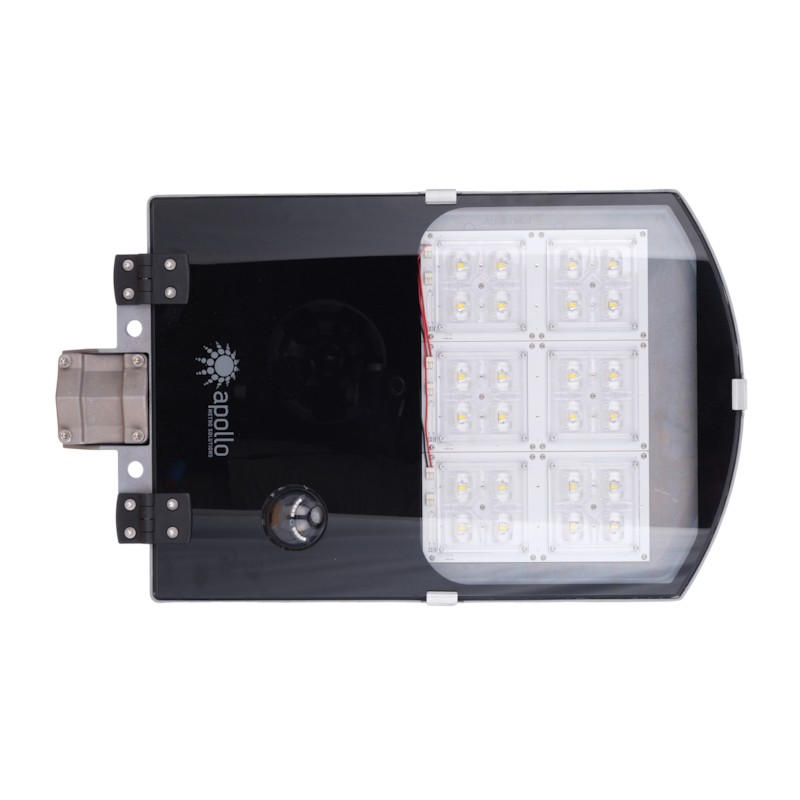 Open interactive 360
An interactive 360 product view produced for Apollo, showing the product from every side in a consistent 143-frame sequence.
Explore this product study →A reflective-product catalog may include multiple diameters, housing shapes, materials, colors, labels and accessory configurations. PhotoSpherix identifies every product against the project list, captures it to the approved standard and keeps the source frames connected to the correct SKU throughout processing and review.
Capture and finishing operate as a pipeline. While the next product reaches the camera, completed sets can move through crop, alignment, exposure and color finishing, background work, dust cleanup and support removal. Automation handles useful repetition; photographers evaluate whether the reflections still describe the surface correctly and whether the product remains consistent with its family.
Internal quality control checks the complete interactive rotation before the client sees it. Products can then be reviewed and approved individually, allowing completed SKUs to move into delivery while later products remain in production.
A contact sheet cannot reveal whether a highlight jumps, an edge disappears or a support flickers as the product turns. PhotoSpherix publishes the interactive 360 to a project-specific review area after internal quality control. Reviewers can inspect the movement, approve the SKU or attach a change request to the correct product.
Approved master imagery can then support several outputs: an interactive viewer, full-resolution product stills, retailer image sequences, derived product video and future channel exports. File dimensions, compression, background, rotation direction, frame numbering, SKU naming and folder structures can follow the customer’s website, distributor, retailer, DAM or PIM requirements.
Planning the master capture for future use, separately from today’s smallest delivery file, preserves useful options. A retailer may accept 24 frames today while the manufacturer retains a higher-resolution, higher-frame-count source set for future channels.
Some distractions can be cleaned, but removing every reflection also removes the information that describes a polished surface. The better approach is to create controlled reflections during capture and use retouching to finish a strong photographic foundation.
Yes, but the product still needs reflected light and dark shapes to define its form. “White background” describes the final canvas; it does not mean the capture environment can be visually empty.
Not automatically. Frame count depends on geometry, desired smoothness, final viewer size and channel requirements. Reflectivity changes the lighting and finishing effort more than it changes the number of useful positions.
Yes. Representative samples, an approved finish standard and product-level review are especially important when shapes and surface treatments vary across the catalog.
Send PhotoSpherix representative products or reference images, the SKU count, finish variations, intended sales channels and delivery requirements. We will evaluate where reflections must describe form, which camera movement adds useful information and what production standard can be repeated across the catalog.
Start a ProjectLighting, position and point of view are chosen around what you, the customer, need to understand about the product.